If you're using a Mac, Disk Utility should be your first stop after plugging in a new drive, which will probaby come formatted for Windows. Windows formatted drives are not unusable on the Mac, but are also not optimal. This is a good article by Matt Neuburg about the proper settings to use.
It's painful to have to redo these settings if you don't get them right while the disk is still bare...
Showing posts with label Mac. Show all posts
Showing posts with label Mac. Show all posts
Friday, May 29, 2009


Wednesday, April 15, 2009
Adobe UI Gripes
Adobe UI Gripes is an awesome kvetch-blog with plenty of screenshots of the funny things that happen when Marketing makes the decision about when the software is ready to ship. I can already think of an error message dialog I need to screen capture next time I see it.
Thursday, March 12, 2009
Saturday, February 07, 2009
The Future of the Layers Palette
John Nack, product manager for Photoshop, requests input on ways to improve the interface for managing the increasingly complex variety and number of layers in a typical design PSD. This should sound familiar:
People end up heavily overloading the few tools they've got--layer names, layer visibility, and nesting layers into folders/groups. Naming conventions work up to a point, but they're clumsy and fragile.
The Layers palette is really a simple outliner of visual data right now, and a lot of the ideas Nack proposes have to do with ways to make that outliner better able to respond to the need for a more automated, error-free design pipeline.
It is a quick and anonymous survey so I encourage you to fill it out if you would be affected by these changes. The last time I took an Adobe survey I got a personal follow-up; it seems like maybe they're finally getting on the clue train.
Sunday, January 11, 2009
Font Explorer Pro
Linotype just launched a Pro version of Font Explorer; Jon Hicks blogged about the icon he made for it.
I like the way the current, standalone version feels; it's like iTunes for fonts, replete with a Store. But mostly I'm just rooting for Linotype to give Suitcase some pro-level competition, since Suitcase + the Adobe Creative Suite = Wristwatch Land. It's pathetic that Linotype can use "Finally an auto-activation function that really works!" as a sell line.
Hmmm, the blurb on the brochure says that "...Landor will definitely be switching..."
Saturday, December 06, 2008
LaunchBar 5
Looks like a lot of long-wished-for improvements are coming in the next version of LaunchBar -- support for multiple (global) clipboards is the big one for me. There are a lot of programs that provide this service, but the way LaunchBar is doing it looks very clean and robust -- a lot of data formats are supported. The ability to add an event to iCal from LaunchBar is also very cool.

Thursday, November 20, 2008
VoodooPad 4
VoodooPad 4 is out. It was already a great tool... and now it finally looks at home on Leopard.
I can't tell you how many times someone has asked me if I remembered some design project we did way back a couple of years ago, and who was the printer, or why did we have to bla-bla-bla, and I'm able to recall it instantly.
It's the best way I know to make your coworkers think you're a genius.
Of course, it only looks like magic if you are diligent about putting stuff into it, and keep your VoodooPad documents available all times.... which is why 4.0 features like document synching and "The Bucket" are cool.
I can't tell you how many times someone has asked me if I remembered some design project we did way back a couple of years ago, and who was the printer, or why did we have to bla-bla-bla, and I'm able to recall it instantly.
It's the best way I know to make your coworkers think you're a genius.
Of course, it only looks like magic if you are diligent about putting stuff into it, and keep your VoodooPad documents available all times.... which is why 4.0 features like document synching and "The Bucket" are cool.
Thursday, October 30, 2008
TextExpander gets an update
Many programs have the ability to assign the current date or time to a shortcut. For instance, I have TypeIt4Me set up so that if I type "dd" it will insert "2008-10-30 Thursday" into whatever I'm writing. But, I've never run across an easy way to have a shortcut that expands to, for example, tomorrow's date.
But, I have now. If you are one of those people who keeps plain text files around in order to Get Things Done, then you may actually be thinking to yourself, why yes, I do hate struggling to type out future dates in year-month-day format all the time. If so, check out TextExpander 2.5.
Monday, August 25, 2008
use your memory usage as your iChat status message

This script will let you use your iChat status message to brag to your friends about how much RAM you've got in your Mac -- or more usefully, petition the IT overlords for mercy if you're scratching to disk a little too much.
I have this triggered periodically by Keyboard Maestro, but there are other ways to get it to run every so often. Not too often, or the overlords will have an easy (if specious) excuse for why it's your own fault you're running out of RAM.
Briefly, it runs a "top" shell command and extracts the two most rhetorically significant memory usage figures, and pipes that to iChat.
set myoutput to (do shell script "top -l 1 | perl -pe " & quoted form of "

my ($unwanted, $wanted) = /(.*inactive,)(.*free)/sm;
$_ = $wanted;

")

tell application "iChat"
      set status message to myoutput
end tell
Friday, July 04, 2008
New Features In Adobe Illustrator CS3
From the Help pages:
Work more fluidly and efficiently without waiting for Illustrator to catch up with your hands and your thoughts. The underlying architecture of Illustrator has been improved. You’ll notice increased scroll and zoom times...
I can vouch for the increased zoom times, but it's a bit odd they'd tout this as a feature...
Thursday, February 14, 2008
Name Mangler
New version of the file renaming utility formerly known as File List. I have used several such utilities and this one's the best. Powerful regexes and conditionals, though I still manage to find things I can't make it do. Probably my fault. New version Leopard-only.
Wednesday, January 09, 2008
NetNewsWire now free
I've been using the previously-free "light" version of this RSS reader for a while; now the full version is free too.
Tuesday, December 04, 2007
Software I Use
I hereby present my list of Geek Force Multipliers.... with URLs now:
Effort Reducers
- LaunchBar — CLI for the GUI. A revolution away from pointing and clicking.
- DragThing — the opposite of LaunchBar; still better than the Dock.
- Path Finder — still better than the Finder. Gets routine things done more easily, and copy operations are faster.
- Typeit4me — now I can type 80 wpm.
- Hazel — rule based refiling to keep up with the torrent. For instance, anything on the desktop with "receipt" in the file name gets moved to the receipts folder.
- MenuCalendarClock — I use this just because it lets me see the date in the menubar in yyyy-mm-dd format, and I don't suppose I need to say why that's so great.
Outboard Brains
- OmniOutliner — for a while every project had an outline; now I use it mostly for structured writing.
- TaskPaper — for the daily hit list.
- VoodooPad — like an extra large messenger bag, it's simple and versatile. Requires a change in mindset to get the most use out of it. Hoping it gains all of taskpaper's abilities over time.
System Utilities
- Cocktail — once every 6 months or so. Good for clearing out font caches, etc.
- Growl — good for use with hazel so you know what your robot is doing.
By the way, a couple of these are on sale this month only through MacSanta.
Monday, October 29, 2007
Leopard
John Siracusa's Leopard review for Ars Technica is, as usual, the "Sunday New York Times" of Macintosh reporting. Highly recommended if you're looking for thorough and forward-looking GUI-to-kernel coverage.Here's the bit that's most intriguing for folks with lots of data locked up in Adobe or Microsoft formats:
Yep, it's (finally) the end of the line for Carbon GUI applications in Mac OS X. Oh, sure, they'll be around for years and years to come, but the lack of 64-bit support is a long-term death sentence.
I can only dream about what Photoshop or Illustrator would be like if they were rewritten in Cocoa...
Friday, October 26, 2007
TaskPaper
TaskPaper is actually a lot more useful than it looks like it might be at first glance. Zero bloat. "Fiddle-proof" as Merlin Mann says....
and it's at least a little bit AppleScriptable. I'm sure Jesse will be working on making that more robust... would be nice to have a QuickSilver-like method of text entry.
Monday, October 01, 2007
Canadian Signal Word Type Height Calculator
If you're in the business of designing packaging for Consumer Packaged Goods to be sold in Canada, you may have run across the amazingly complicated formula for calculating the size of the word "Caution" as it sits at the bottom of the package, warning the consumer not to drink the Drano, or what have you. The corresponding icons for "poisonous," "contents under pressure," etc. are quite punk rock, I will have to upload those later.
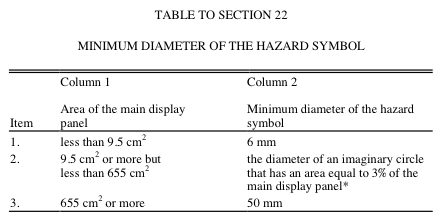
So, this is the kind of thing you only have to do twice before it's safer and easier to offload the entire calculation off to the computer.
Update: Had to escape "STDIN" with backslashes for Blogger. Remove before use.
So, this is the kind of thing you only have to do twice before it's safer and easier to offload the entire calculation off to the computer.
#! usr/bin/perl
# a formula used to calculate size of "signal word" for Cdn cautionary copy.
# Find diameter of a circle with an area equal to 3% of the PDP.
# That's how big any required symbol needs to be.
# The signal word then has to be 1/4 that size.

use Math::Complex;
use constant PI  => 4 * atan2(1, 1);
print "enter the X dimension of your PDP in centimeters\n";
my $xDim = (<\STDIN\>);
print "enter the y dimension of your PDP in centimeters\n";
my $yDim = (<\STDIN\>);
my $PDPArea = $xDim * $yDim;
my $SignalWordHeight = (sqrt(($PDPArea * .03)/PI))/2;

printf "the area of the principal display panel is %.3f cm square, and the signal word should be at least %.3f cm high.\n", $PDPArea, $SignalWordHeight;
Update: Had to escape "STDIN" with backslashes for Blogger. Remove before use.
Saturday, September 29, 2007
Visualization
In which I start out talking about decision trees, and end up talking about shelf sets.
Matt Neuburg has an interesting writeup at Tidbits of a decision making tool called Flying Logic. The program creates "intelligent" decision trees that provide visual feedback as to how to navigate the complex web of dependencies required in order to get to a goal.
Yes, you can do this with a whiteboard (or Omnigraffle), but those don't let you offload logic out of your head.
This is a tool that's probably only worth checking out for major initiatives, but more broadly, the power of visualization in aiding group decision-making can't be overstated. Without visual reference, planning meetings are essentially Socratic dialogs, which is unnecessarily hard work.
Even in the world of brand design, I am often sitting in a meeting talking about "the chosen design" and what needs to happen to it... without any visual reference. Looking around the table, you can see everyone's eyes focussing off in the middle distance as we recall what that design looked like. More unnecessarily hard work.
Think ahead about what needs to be in your library of visual reference material, and keep it at hand in your team's public discussion areas. For CPG design, this means comprehensive shelf sets, and reference for visual equity elements and physical materials. Don't have your meetings in conference rooms, you'll just have to bring your stuff there, and that's too much work, so you won't.
Tuesday, September 25, 2007

Friday, September 14, 2007
More cocoa image editors
Iris, another Cocoa pixel graphics editor coming on line with Leopard. From the makers of Interarchy. No beta until Leopard ships. No idea what that will look like.
And Line Form, a Cocoa vector graphics editor which lets you apply Core Image filters nondestructively to any vector or raster object. Sort of like what Illustrator CS3 would be if it were rewritten from scratch, just for Mac OS X. It's fun.
And Line Form, a Cocoa vector graphics editor which lets you apply Core Image filters nondestructively to any vector or raster object. Sort of like what Illustrator CS3 would be if it were rewritten from scratch, just for Mac OS X. It's fun.
Monday, September 10, 2007
More Acorny goodness
There's a buried plist entry in Acorn to turn on the "Save a copy" menu item... which is as close to "Export for Web" as we get for now.
defaults write com.flyingmeat.Acorn saveACopyMenuItem 1Thanks, Gus, and I'll be sure to let everyone know this is unsupported ;)
Subscribe to:
Posts (Atom)

